
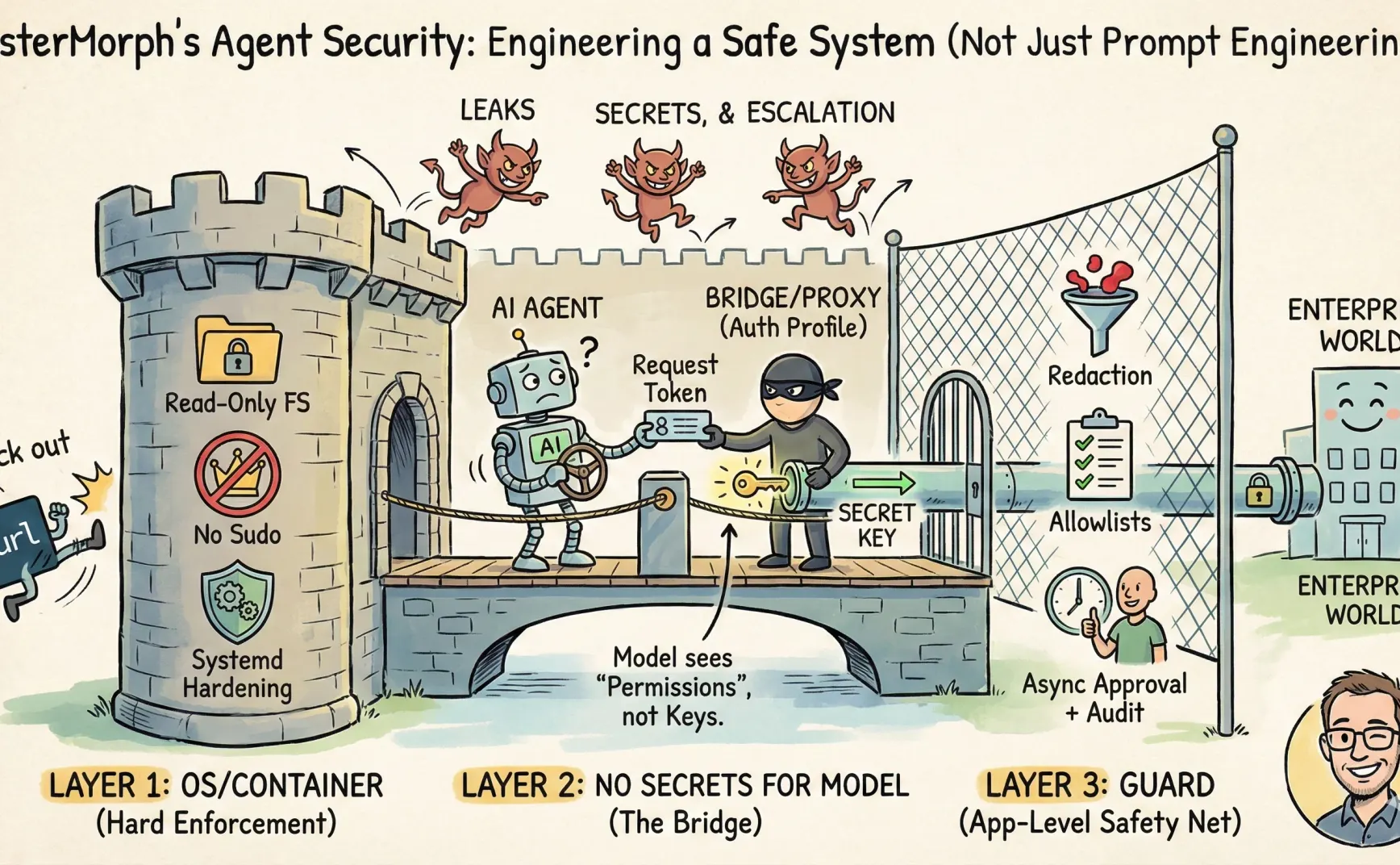
Writing an Agent…
Essentially, it’s about building something that can read and write files, connect to the internet, or even execute shell commands — and then handing over the steering wheel to another thing that can be influenced by prompts, make mistakes, and be misled.
So, I think it’s better to treat Agent development as a kind of permission system engineering rather than prompt engineering.
Some time ago, I had been developing my own AI Agent — mistermorph. Around security, I made several trade-offs: which parts should be handled by the OS/container, which should stay in the application layer, which should be intercepted in the prompt… and how I implemented mistermorph.
This article is a sharing of experience, not an academic paper. It won’t explain how to achieve perfect defense (which is impossible anyway).
For detailed implementation, see mistermorph’s Security Manual.
A Few Principles
- Don’t let the LLM see secrets (tokens, API keys, private keys).
- Don’t let the LLM freely assemble HTTP requests; it will leak secrets.
- Keep a tight rein on bash.
- If the OS/container can solve it, don’t reinvent it elsewhere.
- The application layer should only handle capabilities hard to express in the OS: content redaction, workflow approval, egress allowlists, etc.
- Follow the principle of least privilege.
That’s it.
Threat Model
The risks for an Agent fall into three categories:
- Exfiltration: Sending information to places it shouldn’t go.
- Leakage: Writing sensitive info such as keys/tokens into prompts, logs, tool parameters, or chat history.
- Privilege escalation: Taking unauthorized actions (deleting files, overwriting files, running shell commands).
Before mitigating these three risks, you need to define the system boundary.
Once the boundaries are clear, the potential damage from prompt injection is limited. It might still trick the LLM, but it will hit a wall.
Layer One: OS/Container Controls What Can Be Done
Some strategies are better handled by the OS/container (or systemd) because they enforce policies strictly:
- Don’t give the service process sudo; run it as a standard user.
- Make the root filesystem read-only and restrict writable directories, instead of setting sensitive_path or denylist in the prompt.
- Use systemd hardening options to tighten capabilities:
ProtectSystem,ProtectHome,NoNewPrivileges,PrivateTmp, and so on. - Remove tools like curl from the system, allowing only built-in tools like
url_fetch.
My expectation for the prompt layer is clear: it’s not a sandbox. It can only minimize content/workflow risks. If running the Agent on an enterprise intranet, it’s even better to push egress control down to the container or network layer.
When I run mistermorph myself, I use systemd, a normal user, and basic access control (see here).
Layer Two: Keep Secrets Away from the Model
The main idea is that keys and other credentials required for external interactions should never appear in the prompt, but be held elsewhere.
There are many ways to achieve this. For example, MCP serves as a bridge; or the substitution can happen at the network layer through packet interception.
For Skills, I designed an approach for mistermorph called auth_profile.
Essentially, the agent itself acts as a bridge: it holds the keys, and the skill can only call tools provided by the agent (such as url_fetch), with the agent injecting credentials inside the tools (for example, injecting into the Authorization header).
Even though mistermorph also has a guard for redaction of sensitive data, that’s a cleanup measure — it’s better to prevent the issue in the first place.
For instance, in moltbook, the permissions described in its SKILL.md are not merely weak — they’re basically non-existent.
So in mistermorph, you need to configure it. In moltbook’s SKILL.md, add an auth_profile named moltbook:
auth_profiles: ["moltbook"]
requirements:
  - http_client
  - file_io
Then, in config.yaml, add:
secrets:
  enabled: true
  allow_profiles: ["moltbook"]
  require_skill_profiles: true

auth_profiles:
  moltbook:
    credential:
      kind: api_key
      secret_ref: MOLTBOOK_API_KEY
    allow:
      url_prefixes:
        - "https://www.moltbook.com/api/v1/"
      methods: ["GET", "POST", "PATCH", "PUT", "DELETE"]
      follow_redirects: false
      allow_proxy: false
      deny_private_ips: true
    bindings:
      url_fetch:
        inject:
          location: header
          name: Authorization
          format: bearer
As a result, moltbook’s external access will be restricted to specific domains and methods, without needing to worry about the API key — the agent injects it. Oh, and yes, I also significantly trimmed moltbook’s SKILL.md.
Of course, this design’s side effect is that configuration becomes more like a “permission manifest” rather than a “model input” — but that’s a desirable side effect.
Moreover, secret management itself can later be upgraded, such as moving from environment variables to AWS KMS.
Layer Three: Guard
The Guard module is the cleanup crew. And for cleanup, you need a lot of paper. But you never know which sheet will be the last until you run out.
The reason is simple: the Cartesian product of security policies can explode system complexity, for example:
- Each tool has its own policy.
- Each policy is subdivided by method/body/headers/path.
- Add in prompt content detection, context auditing, and IDS-style rules…
Very soon, you get a system that looks powerful but is nearly impossible to maintain.
So MisterMorph’s Guard only keeps three functions:
1. Outbound Allowlist
Typical examples include various allow_dirs and allow_url_prefixes. MisterMorph implements many of these — some as prompt-level safety fences, others as code-level restrictions.
2. Redaction
Apply rules to scrub known high-risk information from all inputs and outputs.
3. Async Approvals + Audit
Actions requiring human review are paused and returned as pending for external approval, with all risky operations logged for auditing.
For example, when using mistermorph to install a remote skill, the user must first preview the source code, then an LLM performs an audit, and only then can installation proceed.
In short, the Guard is more like an internal safety barrier, while true boundaries should still be enforced by the OS/container.
Finally
Overconfidence and excessive pessimism are both bad. A few prompt rules aren’t enough, but paranoia (like shutting everything down) isn’t practical either. I still need the agent to run in enterprises and generate value.
Before handing the keys to the agent, make sure you know how many doors there are, which ones are iron, which ones require someone’s approval to open, and who stands at the door keeping records.