

We’ve made on-chain payments something both you and your readers will want to use, and understand how to use.
Now, creators on Quaily can enable Solana and Solana-based tokens for subscription content payments and settlements. Readers simply connect their wallet, choose the chain, and confirm payment to complete the subscription.
Features at a Glance
- Multi-chain options: Ethereum (ETH), Base, BSC, Solana.
- Multiple currencies: USDT, USDC, SOL, ETH (for more options, see Guide to Adding Custom Tokens for Payments).
- Fiat equivalence: Checkout and plan pages display approximate prices in USD, so readers know the cost.
- Same process, same experience: Just like other payment methods — cycle, price, VAT (10%), total — then click Connect Wallet to complete payment.
- Non-custodial, direct to creator: Once payment is on-chain, tokens go straight to the creator’s wallet. Quaily never holds or redistributes funds.
Reader Experience
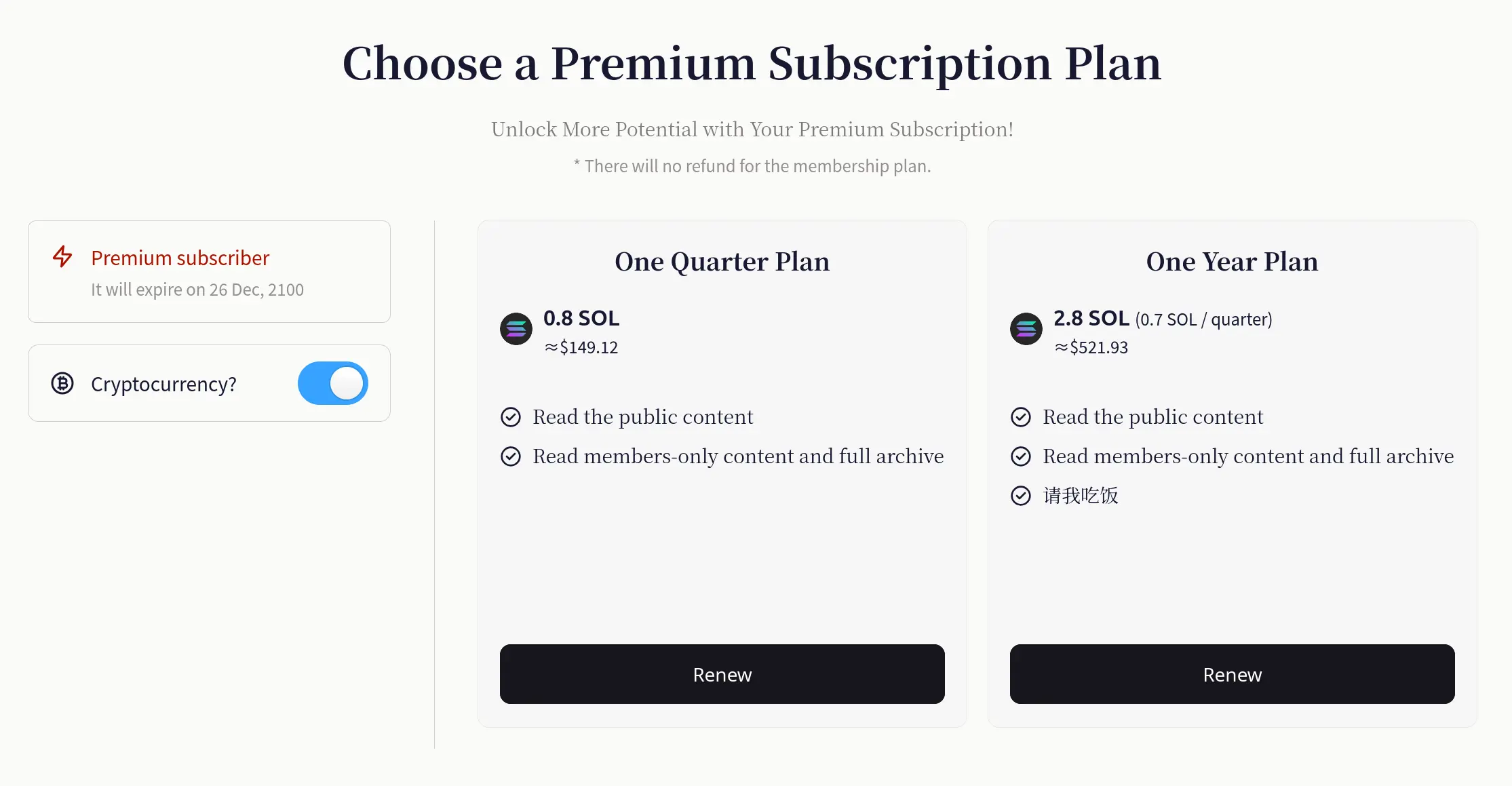
- On the subscription/renewal page, switch to Cryptocurrency payment.
- Select chain: Ethereum / Base / BSC / Solana.
- View the USD estimate for the price, VAT (10%), and total.
- Click Connect Wallet and confirm payment in the wallet.
- If the creator sets a single-chain token (e.g., SOL) as the settlement asset, the reader can only pay on that chain (e.g., Solana) in that token.
- If the creator sets a multi-chain token (e.g., USDT), the reader can choose from chains that support it.
Creator Setup
1) Link your payout wallet and network

In the Cryptocurrency Wallet section of the Payout Settings page:
- Link an EVM address (for Ethereum / Base / BSC, etc.) and enable/disable each EVM network individually.
- Link a Solana address (for receiving SOL, USDT, USDC on Solana).
When readers pay, tokens are sent directly to your linked address on the relevant chain. Quaily does not hold your assets.
Due to blockchain transparency, payout addresses you provide to Quaily are publicly visible. We recommend using a dedicated wallet for receiving payments.
2) Enable on-chain payments and set prices
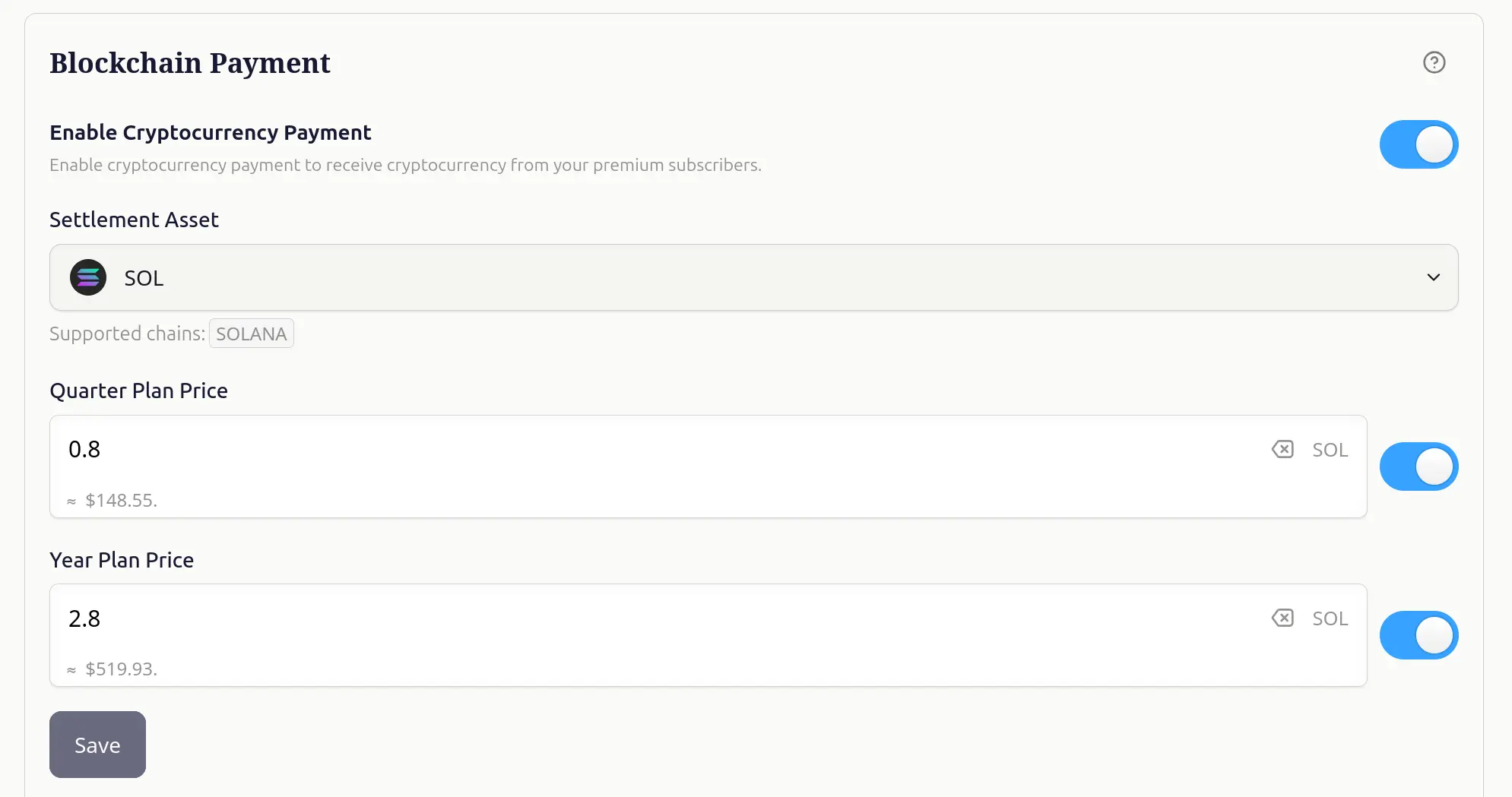
In your channel settings, go to the Monetization page:
- Switch on Enable Cryptocurrency Payment.
- In Settlement Asset, choose the payout token (e.g., SOL).
- When SOL is selected, the system shows Supported chains: SOLANA.
- When USDT/USDC is selected, you can receive payments across multiple chains (Ethereum, Base, BSC, Solana).
- Enter token prices for quarterly/annual plans (e.g., 0.8 SOL/quarter, 2.8 SOL/year). The system will automatically display the approx. USD value.
- Save to apply instantly.
For more stable pricing, choose USDT/USDC as your settlement asset.
Enabling multiple networks can reduce friction for readers by avoiding cross-chain conversions.
FAQ
Q1: Are the payment token and settlement token the same? Does the chain change?
Yes, they are the same and the chain remains the same. If you choose USDT for settlement, the reader must pay in USDT. If multiple chains are enabled, the reader’s payment chain = your settlement chain.
Q2: Does Quaily hold or redistribute my funds?
No. Quaily does not maintain custody or redistribute funds. Payments go directly to your linked wallet.
Q3: How are fees and taxes calculated?
The same as other payment methods: Quaily charges a 10% platform fee; Japanese consumption tax (VAT 10%) is also applied. This is clearly listed on the checkout page.
Q4: Can readers pay in one token while I receive another? Or receive cross-chain?
No. Settlement token = payment token, and they remain on the same chain.
Q5: Why is the token price different from what I see in my wallet?
Token prices are market-driven. Quaily uses multiple on-chain oracles for pricing, so differences from wallet prices are normal. To avoid volatility, creators can opt for stablecoins pegged to fiat.
Q6: How can I support other tokens?
See the Guide to Adding Custom Payment Tokens. Currently, supported custom tokens include V2EX and XIN.
Enable Now
- One-click subscription for crypto-savvy users
- Direct-to-wallet settlement for creators
- Low fees and fast confirmation on Solana + price stability with stablecoin options
Log into the Quaily dashboard, enable Cryptocurrency Payment, link your Solana and EVM wallets, choose a settlement asset, and set your prices.
Your subscription content can now be easily subscribed to and supported on Solana.