
Images 图像
原文地址:
https://developer.apple.com/design/human-interface-guidelines/foundations/images

Always test images on a range of actual devices.
始终确保在一系列实际设备上测试图像。当我们的设计要适配到不同的设备上时,例如 iPhone、安卓手机、大屏电视、中控屏,需要在设备上测试显示效果,保证我们的图不会被压缩或者出现意料外的情况。
Platform considerations
tvOS

Layered images are at the heart of the Apple TV user experience. The system combines layered images, transparency, scaling, and motion to produce a sense of realism and vigor that evokes a personal connection as people interact with onscreen content.
As someone interacts with an image, layers closer to the surface elevate and scale, overlapping lower layers farther back and producing a 3D effect.
分层图像是苹果电视用户体验的核心。(上图展示的卡片就是tvOS里面出现的分层图像),它结合了分层图像、透明度、缩放和动作,(它们聚集在一起形成一个单独的图像。层与层之间的分离,以及透明度的使用,给用户创造了一种深度的感觉。(当用户在操作时),它能产生一种真实感和活力,当人们与屏幕上的内容互动时,唤起一种联系的感觉。
当有人与图像交互时,靠近表面的图层会升高和缩放,重叠较低的图层并产生3D 效果。(我也没有Apple TV,所以没有办法动态演示,脑补一下用遥控器操作卡片的时候,卡片自带的效果)
注:括号内容是我补充的部分
其实还有关于watchOS的部分,但因为我没有参与过watch应用的设计,所以这部分按下不表。
Inclusion 包容性
原文地址:
https://developer.apple.com/design/human-interface-guidelines/foundations/inclusion
❗️包容性设计涉及到的设计意识指导比较多,推荐去原文地址阅读。

As with all design, designing an inclusive app is an iterative process that takes time to get right. Throughout the process, be prepared to examine your assumptions about how other people think and feel and be open to evolving knowledge and understanding.
“正如所有的设计一样,设计一个包容性的应用程序是一个迭代的过程,需要花费时间来获得正确的结果。在整个过程中,准备好检查你对其他人的想法和感受的假设,并对不断发展的知识和理解持开放态度。”做有开放性的设计,是一个挺有挑战的事情,意味着要多想几个迭代,意识到功能的拓展性,在开放的基础上叠加创意,是有趣的挑战。
Inclusive by design 包容性设计
Simple, intuitive experiences are at the core of well-designed apps.
简单、直观的体验是 app 好设计的核心。
Empathy is an important tool in this investigation because it helps you understand how people with different perspectives might respond to the content and experiences you create.
构建同理心是研究包容性设计中的一个重要前提,因为它可以帮助你理解不同视角的人对你创造的内容、体验的反应。
Although each person’s perspective comprises a unique intersection of human qualities that’s both distinct and dynamic, all perspectives arise from human characteristics and experiences that everyone shares, including:
尽管每个人的视角都包含一个独特的人类特质的交叉点,既是独特的又是动态的,但是所有的视角都来源于每个人共有的人类特征和经历,包括:
· Age 年龄
· Gender and gender identity 性别与性别认同
· Race and ethnicity 种族和民族
· Sexuality 性取向
· Physical attributes 身体特征
· Cognitive attributes 认知属性
· Permanent, temporary, and situational disabilities 永久性,暂时性和情境性残疾
· Language and culture 语言和文化
· Religion 宗教
· Education 教育
· Political or philosophical opinions 政治或哲学观点
· Social and economic context 社会和经济背景
我觉得,这些人类特征对于我们做前期的用户研究非常有帮助,可以从这些点出发去研究用户,总结画像。
Welcoming language 欢迎的语言
Using plain, inclusive language welcomes everyone and helps them understand your app.
使用简单、包容的语言欢迎每个人,并帮助他们了解你的产品。
Pay attention to how you refer to people.
注意对人们的称呼。文案上建议使用“你”或“你的”,使用“用户”会让人感到疏远。另外,可以用“我们”指代公司/团队。
Avoid using specialized or technical terms without defining them.
避免使用没有(普适性)定义的专业术语或技术术语。即便用户知道这些专业术语的定义,但如果一开始就使用简单的语言代替专业术语,那么文案也会更加通俗易懂。
Consider carefully before including humor.
仔细考虑一些包含地域性的“笑话”。这种算是极端情况,如果产品文案里面包含了一些带有地域、民族、时效性的“笑话”“段子”“梗”,要考虑那些不接受、不理解他的人的感受,或许会激怒他们或者让他们感觉不舒服。
Being approachable 平易近人
An approachable app doesn’t require people to have particular skills or knowledge before they can use it, and it gives people a clear path toward deepening their understanding over time.
“一个平易近人的 app 并不需要人们拥有特定的技能或知识才能使用,而且它给人们提供了一个随着时间的推移加深理解的清晰途径。”茅塞顿开!给用户提供一个能够推进且清晰的使用路径,在做新手引导设计时,这件事非常重要。
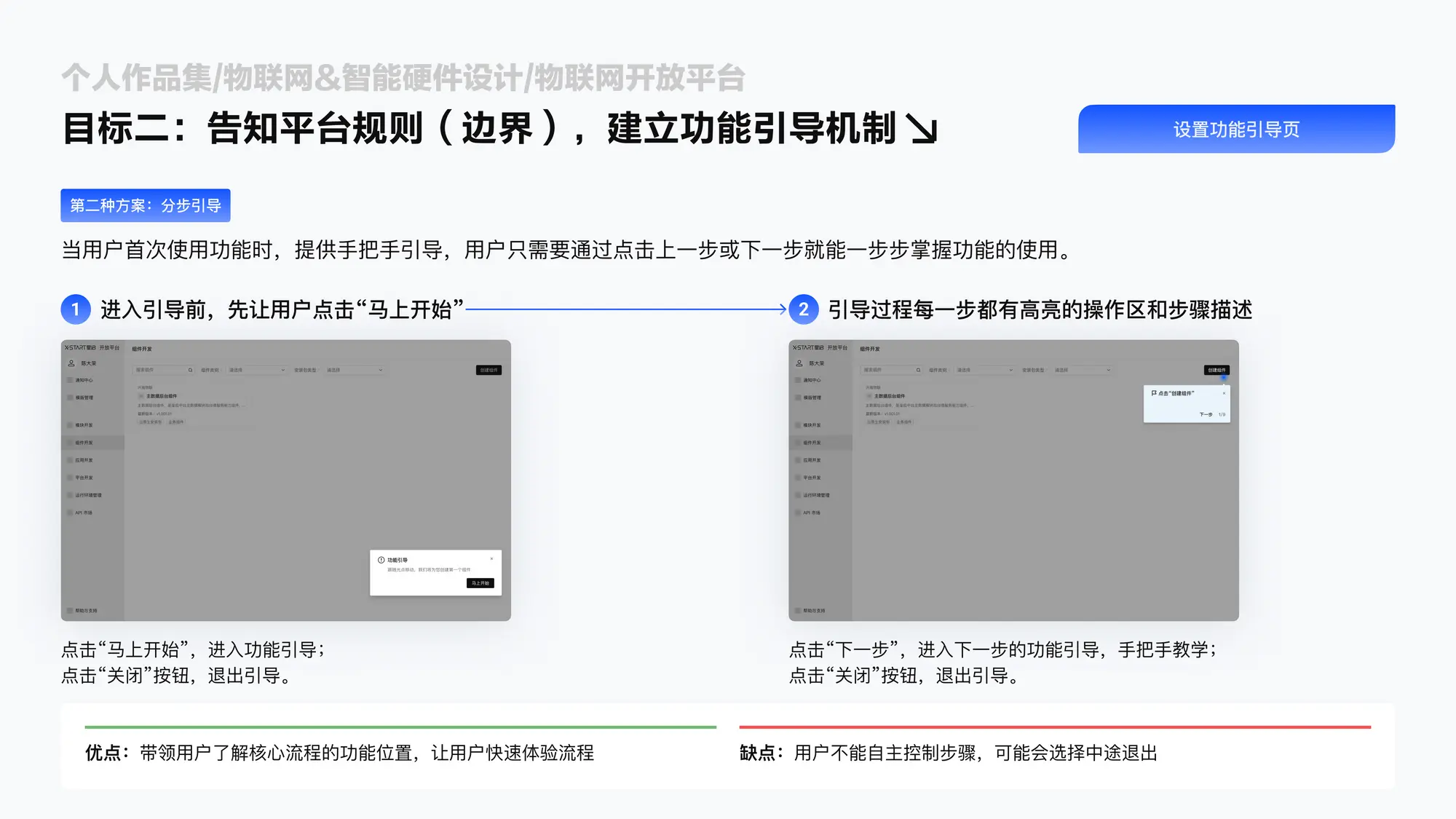
Consider designing a first-launch experience that helps new users take a step-by-step approach while letting experienced users skip straight to the content they want.
“可以考虑设计一个首次发布体验,帮助新用户采取一步一步的方法,同时让有经验的用户直接跳到他们想要的内容。”也就是,对于新手来说,可以提供一个“新手任务”,但也应该允许用户直接跳过。参考我做过的案例👇
Gender identity 性别认同
在苹果看来,大多数 app 是不需要知道用户的性别的。因此,在设计中去除性别符号,将有助于促进包容性。例如使用这样的无性别图标作为用户头像。

but if your app requires this information — such as for health or legal reasons — consider providing inclusive options, such as nonbinary, self-identify, and decline to state.
“但是如果你的应用程序需要这些信息(比如出于健康或法律原因) ,可以考虑提供包容性选项,比如非二进制、自我识别和拒绝状态。”其中,最后一个拒绝显示性别,是目前比较主流的方案,相比起提供更多的性别选项来说,只提供一个后退选项,更容易实现。
People and settings 人物和环境
When people recognize others like themselves within an app and its related materials, they’re less likely to feel excluded and can be more likely to think they’ll benefit from the app.
“当人们在一个应用程序及其相关材料中认出与自己相似的人时,他们不太可能感到被排斥,更有可能认为自己会从这个应用程序中受益。”比如,app中推出了“这些朋友最近跟你听了一样的歌”、“他们之前也买了这件商品”,找到同好,总是会让人开心的。
Avoiding stereotypes 避免刻板印象
Everyone holds biases and stereotypes — often unconsciously — and it can be challenging to discover how they affect your thoughts.
“每个人都有偏见和刻板印象ーー通常是无意识的ーー而且要发现它们是如何影响你的想法是很有挑战性的。”当然不是每个人都能意识到自己的偏见,但产品设计中应该尽量认识到一些偏见,并且避免向用户传达,这涉及到一些框架规则。
比如,在填写家庭成员资料时,默认提供一个父亲、一个母亲、还有孩子的页面框架,但这是狭义的做法,是我们对家庭的传统看法影响了我们去做这样的设计。
在苹果提供的例子中,当一个 app 要求人们选择安全问题,可能会提供这样的问题供用户选择,例如:
- 你在大学里最喜欢的科目是什么?
- 你的第一辆车是什么牌子的?
- 你第一次看到彩虹的时候是什么感觉?
但这些问题关联的事情,并不是每个人都经历过,避免过早给用户做出假设,是做问卷设计时一个比较重要的前提。可以将问题换成更普遍的共同经历,例如:
- 你最大的爱好是什么?
- 你第一个朋友叫什么名字?
Accessibility 无障碍
Prioritize simplicity and perceivability.
“优先考虑简单性和可感知性。”操作简单且一致、容易发现、任务容易执行,能够让更多的人理解app上的内容。
无障碍相关设计指南可以参考这个链接:
https://developer.apple.com/design/human-interface-guidelines/foundations/accessibility
Languages 语言
People expect to customize their device by choosing a language for text and a region for formatting values like date, time, and money. To welcome a global audience, first prepare your app to handle languages and regions other than your own — a process called internationalization .
在国际化的过程中,人们希望通过选择自己熟悉的文本语言和格式化日期、时间和金钱等,来充分为自己使用。所以说,这小节虽然叫语言,但却是广义上的语言,包括了除了口头使用的语言之外,还包括了能够用于国际化的符号、颜色等。
有关国际化,可以参考这个链接:
https://developer.apple.com/documentation/xcode/localization
我最近建了一个电报群,分享日常看到的产品体验设计,开了一个星期,目前是54位朋友订阅了这个频道,可以看看: https://t.me/twentyfourpixelschannel
感谢你的阅读。