
In addition to introducing how to create cloze deletion notes using the Yanki plugin, this guide also covers using the shared deck "Typeable Cloze Template" for creating aesthetically pleasing and convenient cloze notes. Finally, it explains how to use Templater Hotkey scripts to quickly create cloze deletion fields with hotkeys.
◎ Example
Constitution of the Republic of China, Article 1
The Republic of China, founded on the Three Principles of the People, shall be a democratic republic of the people, to be governed by the people and for the people.
The Republic of China, founded on {{Three Principles of the People}}, shall be a democratic republic {{c1::of the people}} {{c2::governed by the people}} {{c3::for the people}}.
1. Yanki Cloze
- Enclose the text to be blanked out with double tildes (
~~). - The tilde pairs will be exported sequentially into the
{{c<number>::text}}format, with the number incrementing starting from 1.
Constitution of the Republic of China, Article 1
The Republic of China, founded on ~~the Three Principles of the People~~, shall be a democratic republic ~~of the people~~ ~~governed by the people~~ ~~for the people~~.
- Front of the Anki card after sync:
Constitution of the Republic of China, Article 1
The Republic of China, founded on {{c1::the Three Principles of the People}}, shall be a democratic republic {{c2::of the people}} {{c3::governed by the people}} {{c4::for the people}}.
- One card will be generated for each cloze deletion.
1.1. Modifying Note Type Styling
- Menu: 【Tools】→【Manage Note Types】, select 【Yanki - Cloze】→【Cards】.
- 【Template】→【Styling】
.card: Usetext-align: leftto left-align the content..cloze: Change the cloze text to bold blue.
.card {
    font-family: arial;
    font-size: 20px;
    text-align: left;
    color: black;
    background-color: white;
}

.cloze {
 font-weight: bold;
 color: blue;
}
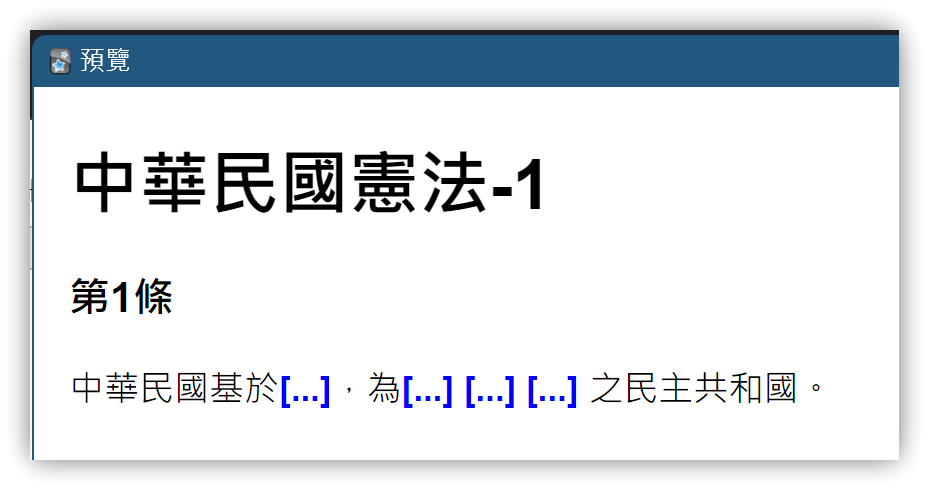
1.2. Same Cloze Group
- Currently, Yanki cannot set the same cloze group number for multiple deletions, i.e., changing
{{c2::through{{c4::all to{{c1::to group them:
The Republic of China, founded on ~~the Three Principles of the People~~, shall be a democratic republic {{c1::of the people}} {{c1::governed by the people}} {{c1::for the people}}.
2. Shared Deck: Typeable Cloze Template
- Browse Shared Decks: 可输入答案的填空模板 - 翏央 / chehil - AnkiWeb
- Save the downloaded .apkg file locally.
- In Anki: 【Decks】→【Import File】, select the downloaded .apkg file →【Import】, then close the import window after completion.
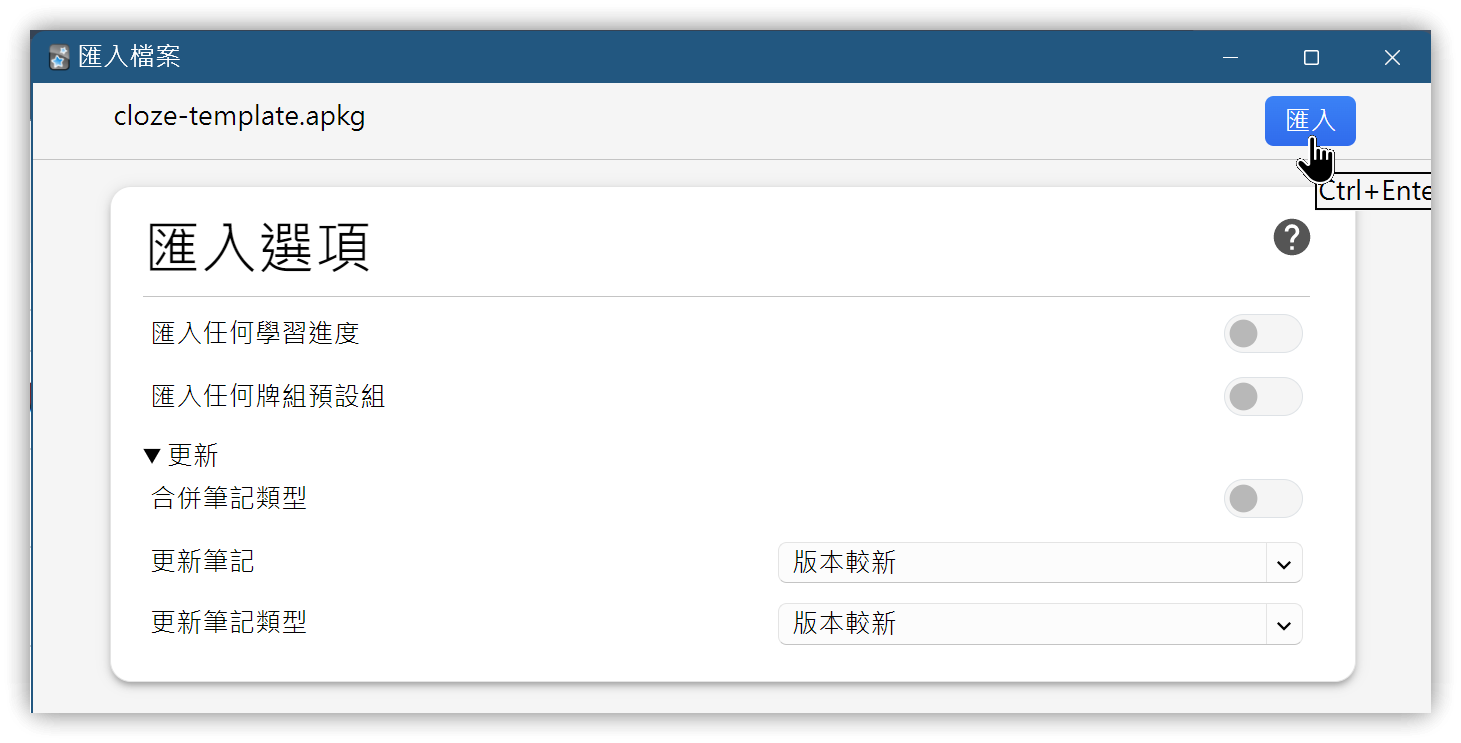
- Imported deck name:
*可输入答案的填空模板. Browse the imported notes/cards. - Content of the QUESTION field:
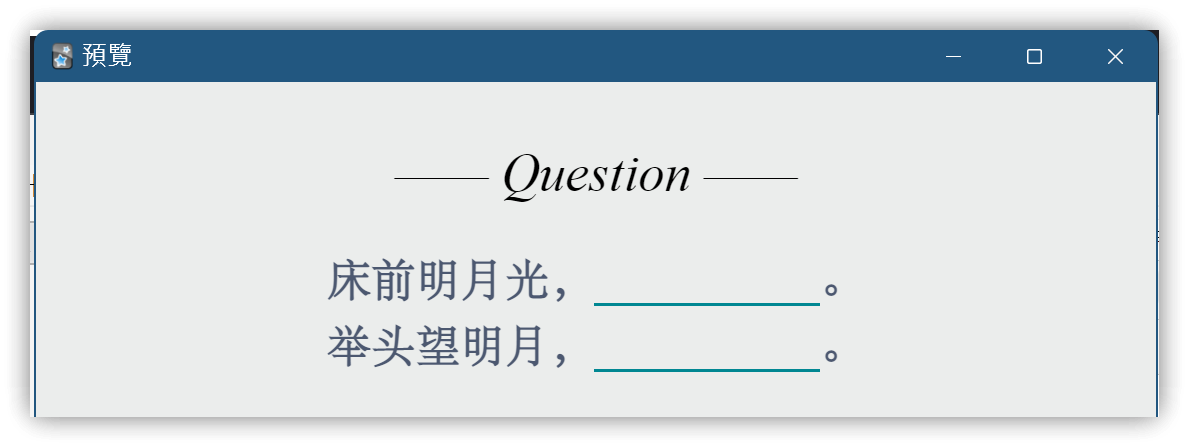
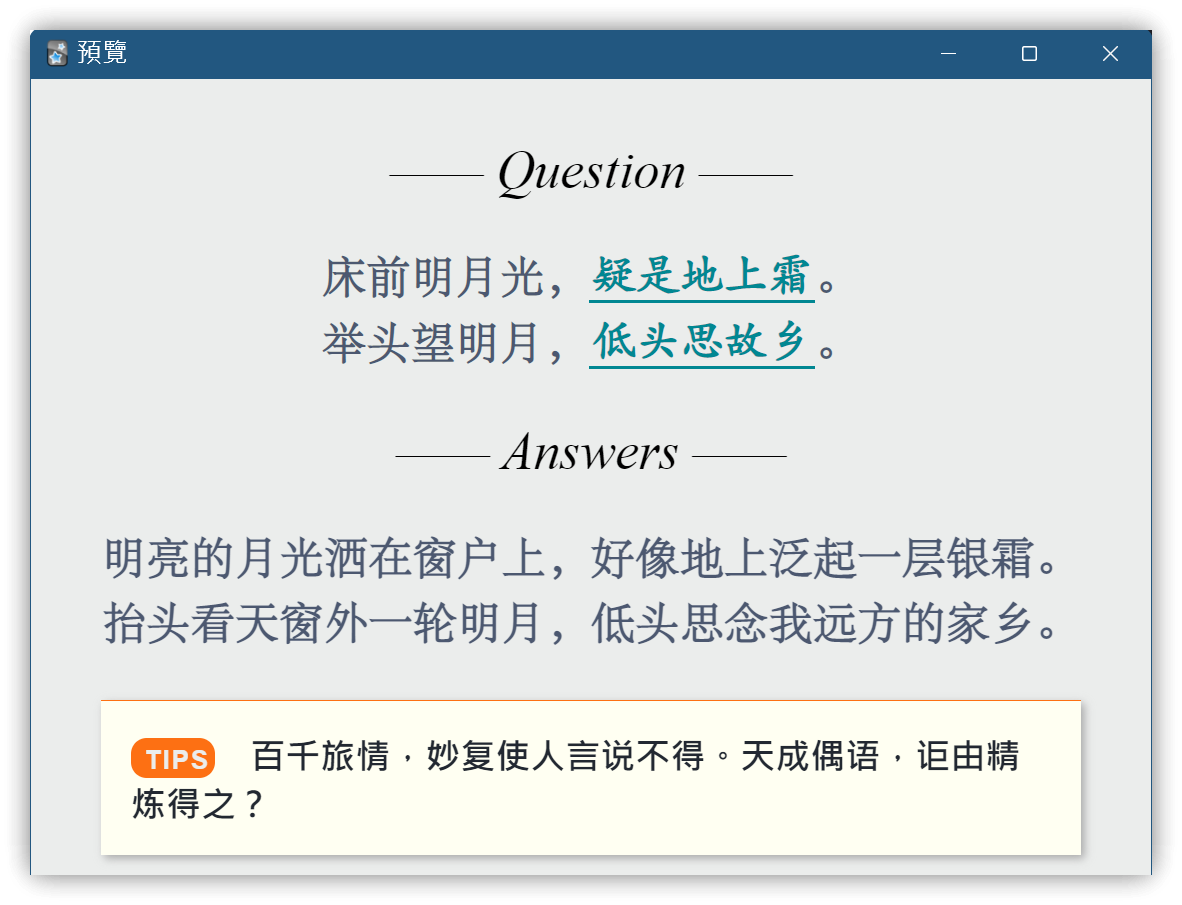
床前明月光,{{疑是地上霜}}。
举头望明月,{{低头思故乡}}。
-
When viewing the card front, the JavaScript script in the note type will specially process the text within the double curly braces.
-
You can type your answer in the blank space to check it against the correct answer on the back. Back:
2.1. Note Type: Type Cloze @翏央chehil
- Front Template
<div class=slide>
  <div class=qu>—— Question ——</div>
  <p></p>
  <div class=question>{{QUESTION}}</div>
</div>

<script>
  TYPE = '1';
  function toggle(cloze) {
    var key = cloze.getElementsByClassName("key")[0];
    var entry = cloze.getElementsByClassName("entry")[0];
    if (entry.style.display == "none") {
      if (TYPE) {
        key.style.display = "none";
        entry.style.display = "inline";
        if (entry.contentEditable == "true") {
          entry.focus();
          entry.onblur = function() {
            answer = entry.textContent.trim()
            if (answer == key.textContent.trim()) {
              entry.style.color = "green";
              entry.innerHTML = answer + '✔';
            } else {
              entry.style.color = "red";
              entry.innerHTML = answer + '✘';
            }
            key.style.opacity = 1;
            entry.contentEditable = false;
          }
        }
      } else {
        key.style.opacity = 1 - key.style.opacity;
      }
    } else {
      entry.style.display = "none";
      key.style.display = "inline";
    }
  }

  [].forEach.call(document.querySelectorAll('.question'),
    function(V0) {
      V0.innerHTML = V0.innerHTML.replace(/\{\{((?:.|\r?\n)+?)\}\}/g,
        '<span class="cloze" onclick="toggle(this)">' +
        '  <span class="key" style="opacity:0">$1</span>' +
        '  <span class="entry" style="display:none;" contenteditable="true"></span>' +
        '</span>')
    });
</script>
- Back Template
 : Full-width space
<div class=qu>—— Question ——</div>
<p></p>
<div class=question>{{QUESTION}}</div>
<hr color=#ebedec>
<div class=slide>
<div class=an>—— Answers ——</div>
<div class=hr3></div>
<div class=hr4></div>
<p></p>
<div class=answer>{{ANSWER}}</div>
<p></p>
{{#TIPS}}
<div class=Tips><ti>TIPS</ti> {{TIPS}}</div>
{{/TIPS}}
</div>
<script>
TYPE = '1';
function toggle(cloze) {
var key = cloze.getElementsByClassName("key")[0];
var entry = cloze.getElementsByClassName("entry")[0];
if (entry.style.display == "none") {
if (TYPE) {
key.style.display = "none";
entry.style.display = "inline";
if (entry.contentEditable == "true") {
entry.focus();
entry.onblur = function() {
answer = entry.textContent.trim()
if (answer == key.textContent.trim()) {
entry.style.color = "green";
entry.innerHTML = answer + '✔';
} else {
entry.style.color = "red";
entry.innerHTML = answer + '✘';
}
key.style.opacity = 1;
entry.contentEditable = false;
}
}
} else {
key.style.opacity = 1 - key.style.opacity;
}
} else {
entry.style.display = "none";
key.style.display = "inline";
}
}
[].forEach.call(document.querySelectorAll('.question'),
function(V0) {
V0.innerHTML = V0.innerHTML.replace(/\{\{(.+?)\}\}/g,
'<span class="cloze" onclick="toggle(this)">' +
' <span class="key" style="opacity:0">$1</span>' +
' <span class="entry" style="display:none;" contenteditable="true"></span>' +
'</span>')
});
[].forEach.call(document.querySelectorAll('.key'),
function(key) {
key.style.opacity = 1
key.style.display = "inline";
});
[].forEach.call(document.querySelectorAll('.entry'),
function(entry) {
entry.style.display = "none";
});
</script>
- Styling
@font-face { font-family: STsong; src: url('_STsong.TTF'); }
@font-face { font-family: STfangsong; src: url('_STfangsong.TTF'); }
@font-face { font-family: kt; src: url('_kt.ttf'); }

.card {
 	padding: 15px 20px;
	font-family:STsong, Arial, serif;
	font-size: 25px;
 	color: #000;
 	background: #ebedec;
}

.qu {
 	font: 30px Times;
 	font-style: oblique;
 	text-align: center;
}

.an {
 	font: 30px Times;
 	font-style: oblique;
 	text-align: center;
}

.question {
	color: #4c5870;
	font-weight: bolder;
	letter-spacing: 0.016em;
	line-height: 150%;
	text-align: justify
}

.answer {
	color: #4c5870;
	font-weight: bolder;
	letter-spacing: 0.016em;
	line-height: 150%;
	text-align: justify
}

ti{
	border-radius: 9px;
	padding: 4px 3px 2px 8px;
 	font: bold 15px Arial;
	text-align: left;
	letter-spacing: 1px;
	color: #ebedec;
	background: #FD7013;
}

.Tips{
 	min-height: 24px;
 	border-top: 1px solid #FD7013;
 	padding: 17px;
	font-size: 20px;
	font-family:仿宋;
	font-weight: bold;
 	text-align: left;
	color: #222831;
	background:#FFFFF2;
	box-shadow: 2px 2px 5px #aaaaaa;
}

.slide {
	position:relative;
	-webkit-animation:slide 2s 0s;
	-webkit-animation-fill-mode:forwards; }

@-webkit-keyframes slide {
	0%		{ opacity: 0;     top: 40px; }
	100%		{ opacity: 1;     top: 0px; }
}

.card.nightMode {
	color: #ebedec;
	background: #121212;
}

.nightMode .question {
	color: #9ba6b2;
}

.nightMode .answer {
	color: #9ba6b2;
}

.nightMode ti {
	color: #121212;
	background: #f9a825;
}

.nightMode .Tips {
	border-top: 1px solid #f9a825;
	color: #ebedec;
	background:#1e1e1e;
	box-shadow: 2px 2px 5px #000000;
}

.cloze {
	color: #008792;
	padding:0 2px;
	border-bottom: solid;
	font-family:kt;
	font-weight:bold;
	letter-spacing:0.002em
}

.nightMode .cloze {
	color: #65bd7b
}
2.2. Using the 翏央 Cloze Template with Yanki - Basic
- Change
{{QUESTION}}to{{Front}}in the template. - Change
{{ANSWER}}to{{Back}}in the template. - Remove content related to
{{TIPS}}. - Insert the styling CSS.
3. Anki's Built-in Field Syntax
{{#FieldName}}: If the field named 'FieldName' is empty, the content between{{#FieldName}}and{{/FieldName}}will not be displayed.- In the Back Template above, if the TIPS field has no content, the content between
{{#TIPS}}and{{/TIPS}}will not be shown.
- In the Back Template above, if the TIPS field has no content, the content between
{{^FieldName}}: If the field named 'FieldName' is empty, the content between{{^FieldName}}and{{/FieldName}}will be displayed.{{type:FieldName}}: Must be placed on both the front and back templates to work. Creates an input box. Input box styling:
input#typeans {
  text-align: center;
  margin: 6px 0;
  margin-left: -14px;
  font-size: 22px;
  padding: 6px 12px;
  outline-style: none;
  color: #18577F;
}
- For cloze deletion
{{cloze:FieldName}}input: use{{type:cloze:FieldName}}
4. Quickly Inserting Cloze Symbols: Using Templater Hotkey
- After selecting the text you want to turn into a cloze, press the hotkey to quickly insert the required symbols.
| Key | Function | Filename | prefix |
|---|---|---|---|
| Alt+` | Insert 翏央 cloze double curly braces {{text}} |
Cmd-anki-cloze.md | {{ |
| Alt+1 | Insert Anki cloze field 1 {{c1::text}} |
Cmd-anki-cloze-c1.md | {{c1:: |
| Alt+2 | Insert Anki cloze field 2 {{c2::text}} |
Cmd-anki-cloze-c2.md | {{c2:: |
| And so on... |
4.1. Steps
- Create the required .md files and paste the Templater script content into them.
- Configure Templater options, adding each .md file.
- Set the corresponding hotkeys in the hotkey settings.
▼ Cmd-anki-cloze-c1.md (Change the prefix variable to the corresponding text)
<%*
let selObj = window.getSelection();
let text = selObj.toString();
let prefix = "{{c1::";  // Change prefix
let isClozed = false;
if (text.startsWith(prefix)) {
  isClozed = true;
  text = text.substring(prefix.length)
}
if (text.endsWith("}}")) {
  isClozed = true;
  text = text.substring(0, text.length-2)
}
if (!isClozed) {
  text = prefix + text + "}}";
}
return text;
-%>
5. 💡 Related Links
💡 Explanatory Article: https://jdev.tw/blog/8477/
✅Yanki: https://github.com/kitschpatrol/yanki-obsidian
✅ Typeable Cloze Template - 翏央: https://ankiweb.net/shared/info/356679663