
The Note Annotations plugin provides functionality for highlighting text while taking reading notes. After selecting a passage, the highlighted annotation will be saved. When hovering the cursor over it, the annotation content will be displayed.
1. Feature Demonstration
After installing and enabling the Note Annotations plugin, a toggle option will appear in the status bar. Clicking it will switch between enabled/disabled states.
▼ Live Preview Mode

▼ Source Mode

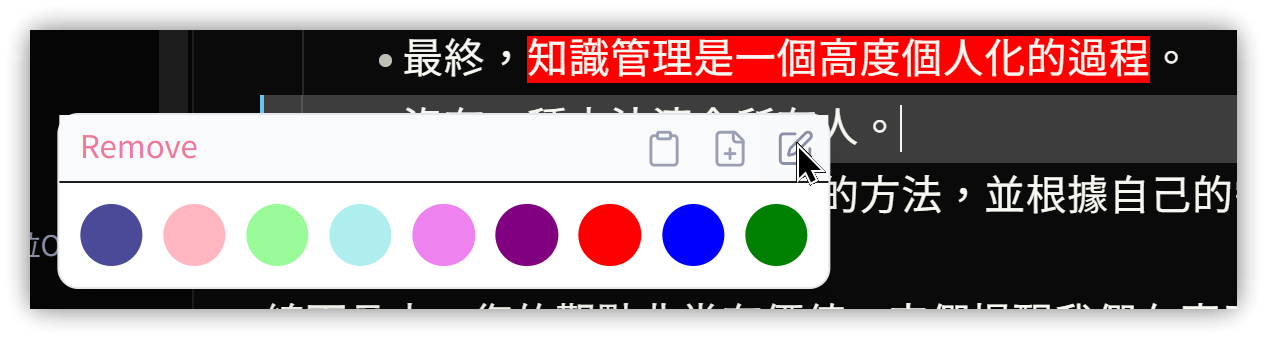
- Clicking the annotation area allows you to choose a background color, copy the content to the clipboard, create a new note from the content, or edit the annotation data.
- Annotation data is appended to the note as HTML comments, preventing data loss issues.
2. Settings
- Expand selection: When Highlighting mode is enabled, determines whether to automatically expand the selection to whole words. For example, if the text is "Annotations" and you select "Ann", should it automatically expand to the complete word ("Annotations") when releasing the left mouse button?
- Highlighting color options: Customize the background color for highlighted text. Must use HTML color codes; the
#numberformat is not allowed.
3. Usage Instructions
- Click "Highlighting mode" in the status bar. Once in this mode, use the left mouse button to select important text. Release to open the annotation editing pop-up window.
- Choose background color: Changes will take effect after restarting Obsidian.
- "Remove" on the left removes existing annotations.
- The first icon on the right copies the content to the clipboard.
- The second icon on the right creates a new note from the content.
- The third icon on the right edits the annotation data.
- Commands
- Highlight Selection: Select text first, then execute the command. Can be used to create annotations even when not in Highlighting mode.
- Toggle Highlight Mode: Switch the mode on/off.
4. 💡 Related Links
💡 Explanatory article: https://jdev.tw/blog/8691/
✅ Note Annotations: https://github.com/jancbeck/obsidian-note-annotations
✅ Similar plugin - Highlight Mode: https://github.com/LizzardKing94/Obsidian-Highlight-Mode