
Previously, I introduced the three query modes and basic operations of the Copilot for Obsidian plugin. This time, let's delve deeper into its other features.
1. Custom Prompts
We can think of custom prompts as prompt templates. They allow us to save frequently used prompts as modes for repeated use.
Copilot provides three commands: Add custom prompt, Edit custom prompt, and Delete custom prompt to add, modify, and delete custom prompts, respectively. Once created, use Apply custom prompt to send the prompt to the large language model.
1.1. Adding a Prompt
- The custom prompt dialog box has only two fields: Name and Content. After entering the details, click [Save].
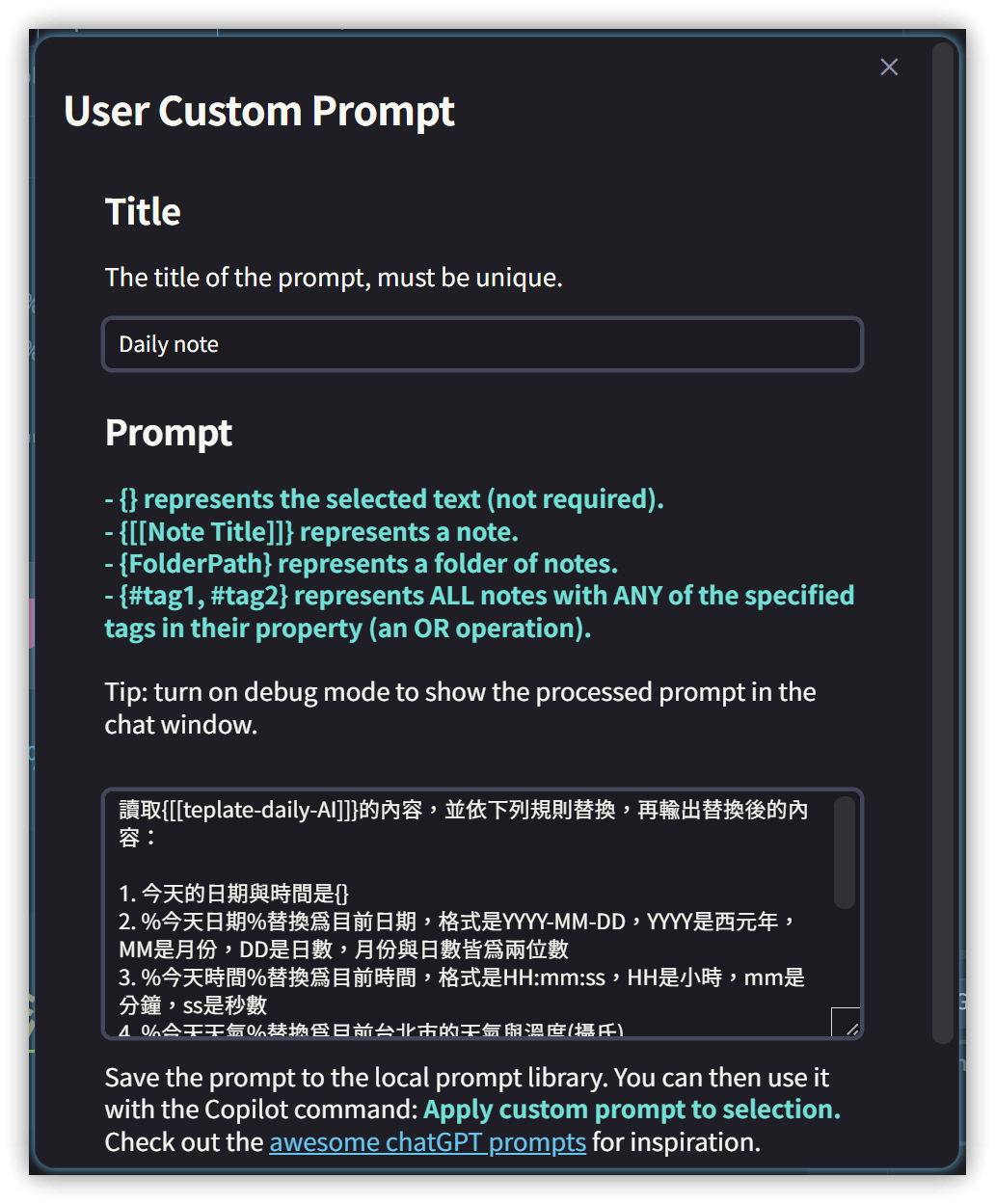
The prompt content can include the following special keywords to provide dynamic information:
{}represents the selected text.{[[NoteFileName]]}specifies a particular note.{FolderPath}represents the note's folder path.{#tag1,#tag2}represents tag1 or tag2.
For example, the content of my Daily Note prompt is:
Read the content of {[[template-daily-AI]]}, replace according to the following rules, and then output the replaced content:
1. Today's date, time, and weather are {}
2. Replace %TodayDate% with today's date in YYYY-MM-DD format (YYYY is the year, MM is the month, DD is the day; month and day should be two digits).
3. Replace %TodayTime% with the current time in HH:mm:ss format (HH is hour, mm is minute, ss is second).
4. Replace %TodayWeather% with the current weather.
5. Replace %YesterdayDate% with yesterday's date in YYYY-MM-DD format.
6. Replace %TomorrowDate% with tomorrow's date in YYYY-MM-DD format.
7. If today is Friday, output the content between %FridayBEGIN% and %FridayEND%. Otherwise, do not generate the content between %FridayBEGIN% and %FridayEND%.
8. If today is Monday, output the content between %MondayBEGIN% and %MondayEND%. Otherwise, do not generate the content between %MondayBEGIN% and %MondayEND%.
1.2. Dynamic Note Filename
Another custom prompt:
Read the content of [[{}]], generate 3 questions and answers in Chinese using Markdown format. Each question's first line must use an h3 tag and start with an ordered number.
The original intention was to use the selected text as the note filename, but testing showed that [[SelectedText]] was sent, failing to meet the requirement for a dynamic filename.
Revised prompt:
Content to process: {}
Based on the processed content, generate 3 questions and answers in Chinese using Markdown format. Each question's first line must use an h3 tag and start with an ordered number.
2. Commands Provided by Copilot
Copilot offers the following commands, accessible via the command palette:
| Command | Function |
|---|---|
| Add custom prompt | Add a custom prompt template |
| Edit custom prompt | Edit a custom prompt template |
| Delete custom prompt | Delete a custom prompt template |
| Apply custom prompt | Apply a custom prompt |
| Apply ad-hoc custom prompt | Apply a one-time custom prompt |
| Change tone of selection | Change the tone of the selected text (e.g., professional, casual) |
| Toggle Copilot Chat Window | Show/hide the Copilot panel |
| Toggle Copilot Chat Window in Note Area | Show/hide the Copilot panel in the editing area |
| Clear local vector store | Clear the local vector store |
| Count words and tokens in selection | Count words and tokens in the selected content |
| Count total tokens in your vault | Count the total number of tokens in your vault |
| Explain selection like I'm 5 | Explain the meaning of the selected text to a 5-year-old |
| Emojify selection | Add emojis to the selected text |
| Fix grammar and spelling of selection | Correct grammar and spelling errors in the selected text |
| Force re-index vault for QA | Force re-indexing of the vault for QA |
| Garbage collect vector store (remove files that no longer exist in vault) | Perform garbage collection on the vector store (remove files no longer in the vault) |
| Generate glossary for selection | Generate a glossary for the selected content |
| Generate table of contents for selection | Generate a table of contents for the selected content |
| Index (refresh) vault for QA | Index (refresh) the vault for QA |
| Make selection longer | Make the selection longer |
| Make selection shorter | Make the selection shorter |
| Rewrite selection to a press release | Rewrite the selected text as a press release |
| Remove URLs from selection | Remove URLs from the selected text |
| Rewrite selection to a tweet | Rewrite the selected text as a tweet |
| Rewrite selection to a tweet thread | Rewrite the selected text as a tweet thread |
| Set note context for Chat mode | Set the note context for Chat mode |
| Set exclusion for Vault QA mode | Set exclusions for Vault QA mode |
| Simplify selection | Simplify the selected text |
| Summarize selection | Summarize the selected text |
| Translate selection | Translate the selected text |
3. 💡 Related Links
💡 Explanatory article: https://jdev.tw/blog/8393/
✅ logancyang/obsidian-copilot: A ChatGPT Copilot in Obsidian
✅ YouTube channel of the Copilot for Obsidian author: https://www.youtube.com/@loganhallucinates/videos