

Do notes need version control? I believe any output related to creation or writing requires version control. You never know if the text written today might need its content evolution traced back later.
The ideal way to implement version control for notes is using a version control system like Git, a tool used in software development to manage code versions. However, if you're unfamiliar with Git or want a simpler, more automated approach, the diffzip plugin is worth trying.
After using diffzip, I occasionally encountered Obsidian causing high CPU usage, which returned to normal after a few seconds.
1. diffzip Functionality
When you run diffzip for the first time, it compresses all notes in the vault into an initial ZIP file. Simultaneously, it creates a backupinfo.md file in the backup folder to record the modification times of the notes. Subsequent changes to notes will then be differentially added to new ZIP files.
Do not modify backupinfo.md yourself, as it may affect backup operations.
This means only the first ZIP file contains all notes at the time of backup; subsequent ZIP files only back up new and modified notes. This prevents generating large files every time, saves disk space, and allows for quick restoration of specific files.
Executing Create Differential Backup from the Command Palette will immediately back up any changed files.
2. Settings
- It's recommended to enable the automatic backup feature when Obsidian starts, ensuring all changes are automatically recorded without omission.
Include hidden folder: It's recommended to disable this to skip folders like.obsidian,.git, etc.
3. Backup History
You can check backupinfo.md to view the backup history of a specific note. When restoring, you can filter for the ZIP files that contain backups of that file:
▼ Example
test.md:
  digest: dee824d7f626a1fc3ead477aeccf724718192fac37943d4245d144287b447d03
  filename: test.md
  mtime: 1709991840889
  history:
    - zipName: 2024-3-8-42820.zip
      modified: 2024-03-07T14:00:00.000Z
    - zipName: 2024-3-8-43824.zip
      modified: 2024-03-08T04:08:31.193Z
    - zipName: 2024-3-9-78930.zip
      modified: 2024-03-09T13:44:00.889Z
4. Restoration
Executing Restore from backups from the Command Palette allows you to restore backup files to a specified folder.
- First, select the filename of the note to restore.
- Choose which ZIP file to use.
- Specify the restoration location:
- Restore to the configured
restoredfolder. - Restore and overwrite the existing note.
- Restore to the note's original location, appending the ZIP filename to the filename (e.g.,
test.mdrestored astest-2024-3-8-42820.md).
- Restore to the configured
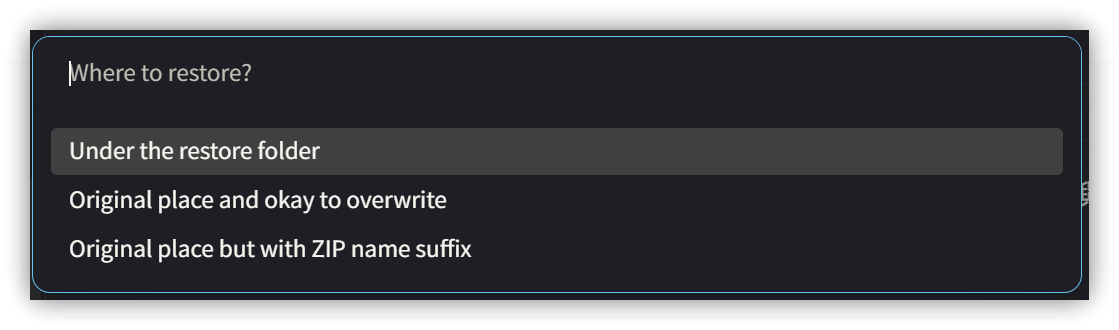
- If restoring to the
restoredfolder or with the ZIP date appended to the filename, you can use tools like Beyond Compare or WinMerge to compare and merge content.
5. 🙋♂️ Have questions...
As backup files accumulate, the disk space they occupy increases. If the vault is synced using cloud storage, consider how to reduce space usage.
A possible method is to set the backup folder as a symbolic link. Cloud storage services usually do not sync folder links (Dropbox, for example, does not).
Regarding version control needs: If you can use Git, it offers a more complete solution.
6. Related Links
💡 Explanatory article: https://jdev.tw/blog/8382/
✅ diffzip: https://github.com/vrtmrz/diffzip