

Previously, we introduced the Awesome Image plugin for viewing images, which can enlarge images displayed in the center and perform image operations like rotation and mirroring. However, changing the size of images in the original text required manually modifying the size in . Now, with AttachFlow, you can directly resize images by dragging with the mouse.
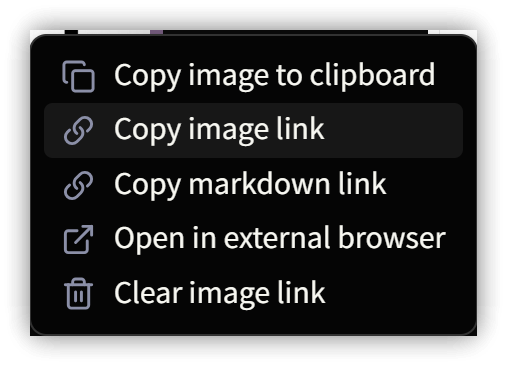
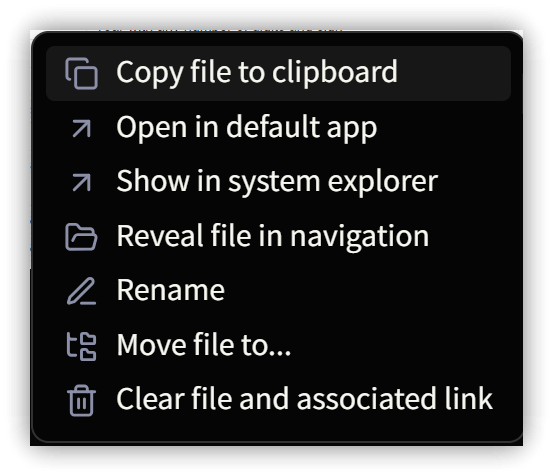
Image content and links can also be quickly copied using the right-click context menu, eliminating the need to manually copy URL strings.
Additionally, images in URL form can be copied with a right-click, without having to first copy the URL and then browse, making the operation much more convenient.
Although these are minor features, they can significantly improve work efficiency. When frequently working with images, they can indeed bring more convenience.
AttachFlow is currently not available in the community plugins. It must be manually downloaded or installed using BRAT
Cloud Images

Local Images

Excalidraw
-
![[097-Draws/JasperReports-Arch.excalidraw|486]]
-
Left-click and move to the edge of the image: Enlarge or shrink the image, automatically modifying
upon release- Applies to embedded Excalidraw and PDF++ as well
-
Left-click and move to the right half of the image: View the image, use the scroll wheel to zoom, left-click and drag to move the position
-
Right-click menu allows copying the image, copying the link, etc.
1. 💡 Related Links
💡 Explanatory article: https://jdev.tw/blog/8725/
✅ AttachFlow: https://github.com/Yaozhuwa/AttachFlow
✅ Awesome Image: https://youtu.be/d0NC2sQkDVE