
Previously, in Obs143|Using Tabbed Interfaces: The HTML Tabs Plugin; Enhancing Presentation Convenience in Obsidian, I demonstrated how to use the HTML Tabs plugin to create tabbed sections within notes. Today, we'll look at the more feature-rich obsidian-tabs plugin and the comparatively simpler Tab-Panels.
1. Tabs
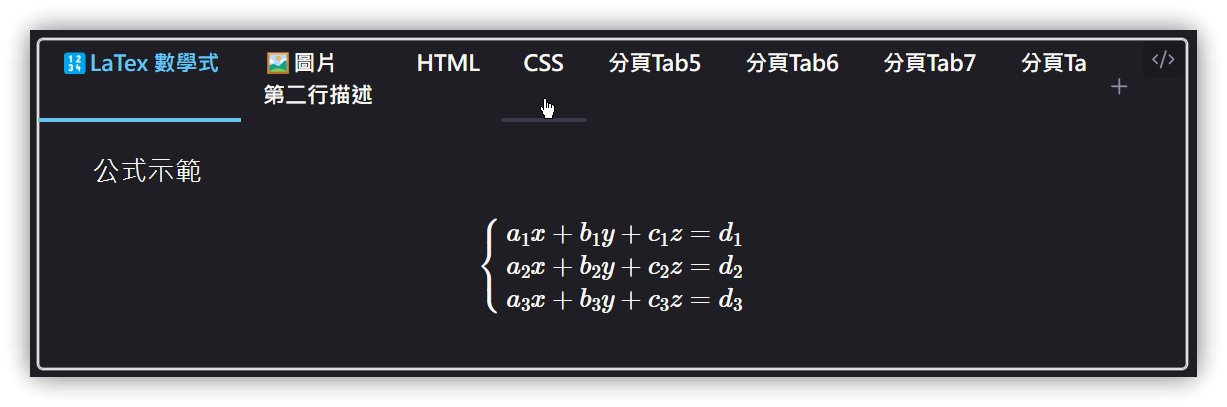
- Use a code block with the language set to
tabs, i.e., ```tabs. - The first line can specify display styles:
- Tab position:
top,bottom,left,right - Tab row count:
one,multi
- Tab position:
- Double-click the tab content to open an edit window.
- Includes a "Convert selected text to tabs" command.
top, multi
tab: 🔢 LaTex Math Expressions
Formula example
$$
\begin{cases}
a_1x+b_1y+c_1z=d_1\\
a_2x+b_2y+c_2z=d_2\\
a_3x+b_3y+c_3z=d_3\\
\end{cases}
$$
tab: 🖼️ Image<br>Second line description
Embed image
tab: HTML
```HTML
<html>
<head>
<script src="test.js"></script>
<link rel="stylesheet" href="mystyle.css">
</head>
<body>
<div class="note">
My Note
</div>
</body>
<script>
test();
</script>
</html>
```
tab: CSS
```css
body {
color: red;
background-color: lightYellow;
}
```
tab: Tab 5
Tab 5 content
tab: Tab 6
Tab 6 content
tab: Tab 7
Tab 7 content
tab: Tab 8
Tab 8 content
tab: Tab 9
Tab 9 content
tab: Tab 10
Tab 10 content
tab: Tab 11
Tab 11 content
tab: Tab 12
Tab 12 content
1.1. Differences from HTML Tabs
---tab JavaScriptis changed totab: JavaScript.- Tabs: The initial
~~~tabscan still be used, or it can be changed to ```tabs`.
tab: 🛜HTML
```html file:test.html ln:true
<html>
<head>
<script src="test.js"></script>
<link rel="stylesheet" href="mystyle.css">
</head>
<body>
<div class="note">
My Note
</div>
</body>
<script>
test();
</script>
</html>
```
tab: 🖼️CSS
```css file:mystyle.css ln:true
body {
color: red;
background-color: lightYellow;
}
```
tab: 🧑💻JavaScript
```js file:test.js ln:true
<script>
function test() {
alert("Hello!");
}
</script>
```
Codeblock Customizer Integration
Remember to add tabs to the Basic → Exclude languages list.
2. Tab Panels
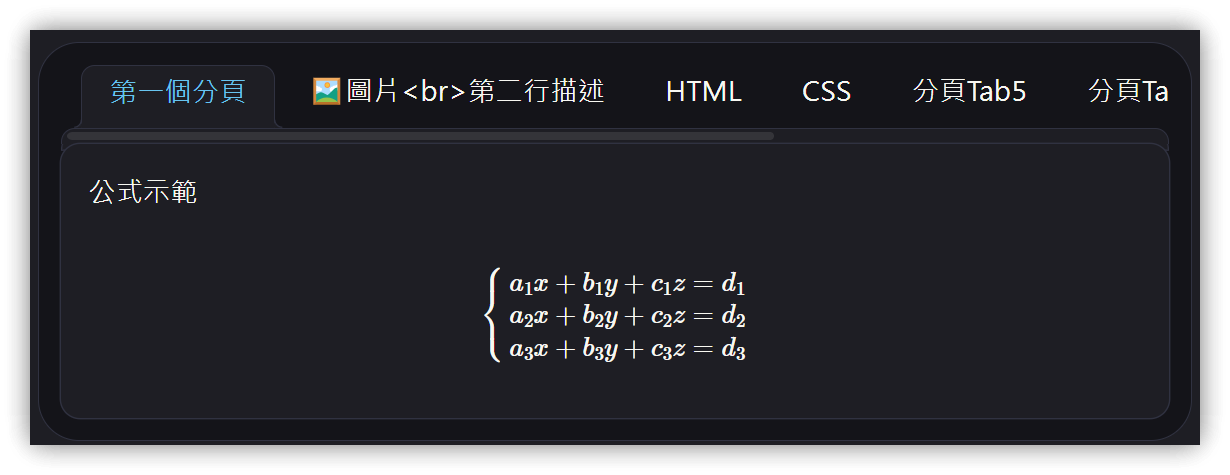
- Use a code block with the language set to
tab-panels, i.e., ```tab-panels. - Each tab format:
--- Tab Title - Tab titles cannot contain HTML tags.
--- First Tab
Formula example
$$
\begin{cases}
a_1x+b_1y+c_1z=d_1\\
a_2x+b_2y+c_2z=d_2\\
a_3x+b_3y+c_3z=d_3\\
\end{cases}
$$
--- 🖼️ Image<br>Second line description
Embed image

--- HTML
```html
<html>
<head>
<script src="test.js"></script>
<link rel="stylesheet" href="mystyle.css">
</head>
<body>
<div class="note">
My Note
</div>
</body>
<script>
test();
</script>
</html>
```
--- CSS
```css
body {
color: red;
background-color: lightYellow;
}
```
--- Tab 5
Tab 5 content
--- Tab 6
Tab 6 content
--- Tab 7
Tab 7 content
--- Tab 8
Tab 8 content
Codeblock Customizer Integration
Remember to add tab-panels to the Basic → Exclude languages list.
3. 💡 Related Links
💡 Explanatory article: https://jdev.tw/blog/8592/
✅ obsidian-tab-panels: https://github.com/GnoxNahte/obsidian-tab-panels
✅ obsidian-tabs: https://github.com/xhuajin/obsidian-tabs
✅ obsidian-html-tabs: https://github.com/ptournet/obsidian-html-tabs
4. Tutorial Video
##