

kd is an open-source command-line dictionary tool available on GitHub. Simply pass the word you want to look up, and it will immediately display information such as the word's definition and example sentences. It also includes a parameter for translating entire sentences, making it very convenient for frequent English-Chinese and Chinese-English translation needs.
kd is written in the Go language and supports Windows, MacOS, and Linux.
On Windows, you can use it directly after downloading kd.exe. When run for the first time, it generates a dictionary file at C:\Users\<Username>\.cache\kdcache\kd_data.db, which is used for local lookups.
Adding the -n option during execution will connect to the network dictionary online.
1. kd Usage Instructions
-hlists the usage instructions.--updatecan update the software version.
c:/util # kd -h
NAME:
   kd - A crystal clean command-line dictionary.

USAGE:
   kd [global options]

VERSION:
   v0.0.12

AUTHOR:
   kmz <[email protected]>

GLOBAL OPTIONS:
   --nocache, -n            don't use cached result 不使用本地词库,查询网络结果
   --theme value, -T value  choose the color theme for current query 选择颜色主题,仅当前查询生效 (default: temp)
   --daemon                 ensure/start the daemon process 启动守护进程
   --update                 check and update kd client 更新kd的可执行文件
   --generate-config        generate config sample 生成配置文件,Linux/Mac默认地址为~/.config/kd.toml,Win为~\kd.toml
   --edit-config            edit configuration file with the default editor 用默认编辑器打开配置文件
   --help, -h               show help
   --version, -v            print the version
Just pass the word you want to look up directly. The displayed content includes DJ and KK phonetic transcriptions, Chinese definitions, English definitions, and example sentences.

It can also perform Chinese-English translation.

Adding the -t option allows you to translate entire sentences.

2. Displaying Traditional Chinese
kd's dictionary uses Simplified Chinese. Although kd_data.db is an SQLite3 database, its content is compressed, making conversion somewhat complex. Therefore, the output can be directly passed to OpenCC for conversion to Traditional Chinese. For OpenCC installation and usage, please refer to my previous video: OpenCC(Open Chinese Convert)能準確的簡轉繁與繁轉簡,經常下載簡體網路小說的朋友們必備!(內嵌字幕)
The OpenCC command is c:\util\opencc\opencc -c c:\util\opencc\conf\s2tw.json, specifying conversion from Simplified Chinese to Taiwan Traditional Chinese format. After processing with OpenCC, the original display formatting (like colors, italics, etc.) might be lost.

3. Integration with Obsidian
If you want to paste lookup results directly into Obsidian, you can use the Shell Commands plugin. Here are the steps:
-
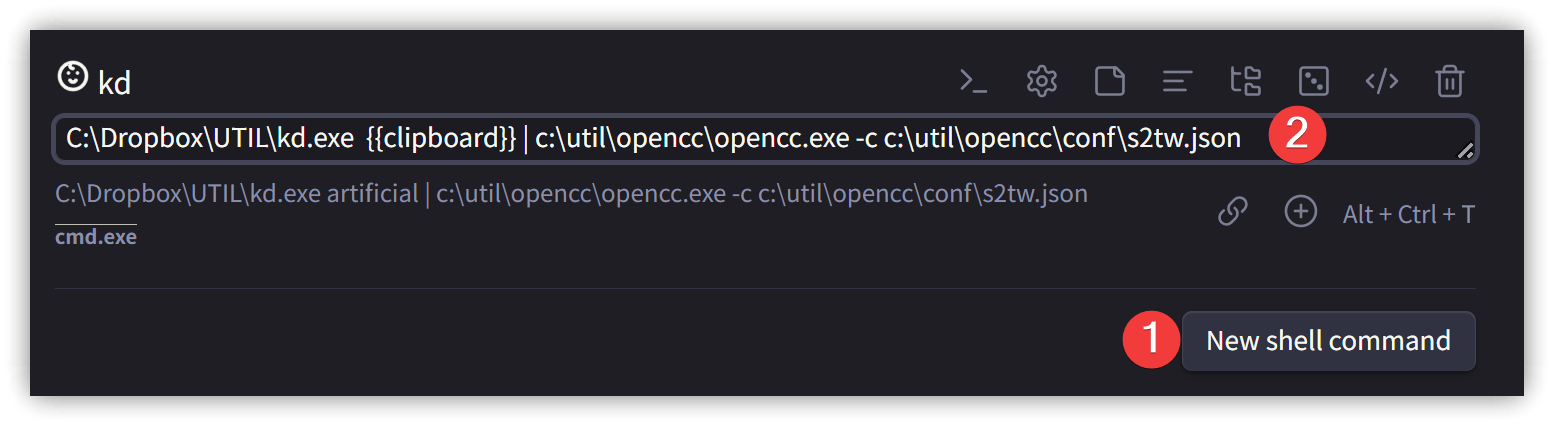
In the Shell Commands plugin settings, add a new command named
kd. Copy the word to look up to the system clipboard. You can also try the Shell Commands' Prompt setting for a preview before execution. -
In the Shell Commands' Output tab, set 【Output channel for stdout】 to 【Current file: caret position】 to write the result at the cursor's location.
-
Instead of
{{clipboard}}, you can use{{selection}}to use the selected text. In this case, the output method must be changed to something else, such as outputting to the clipboard or the end of the file.
-
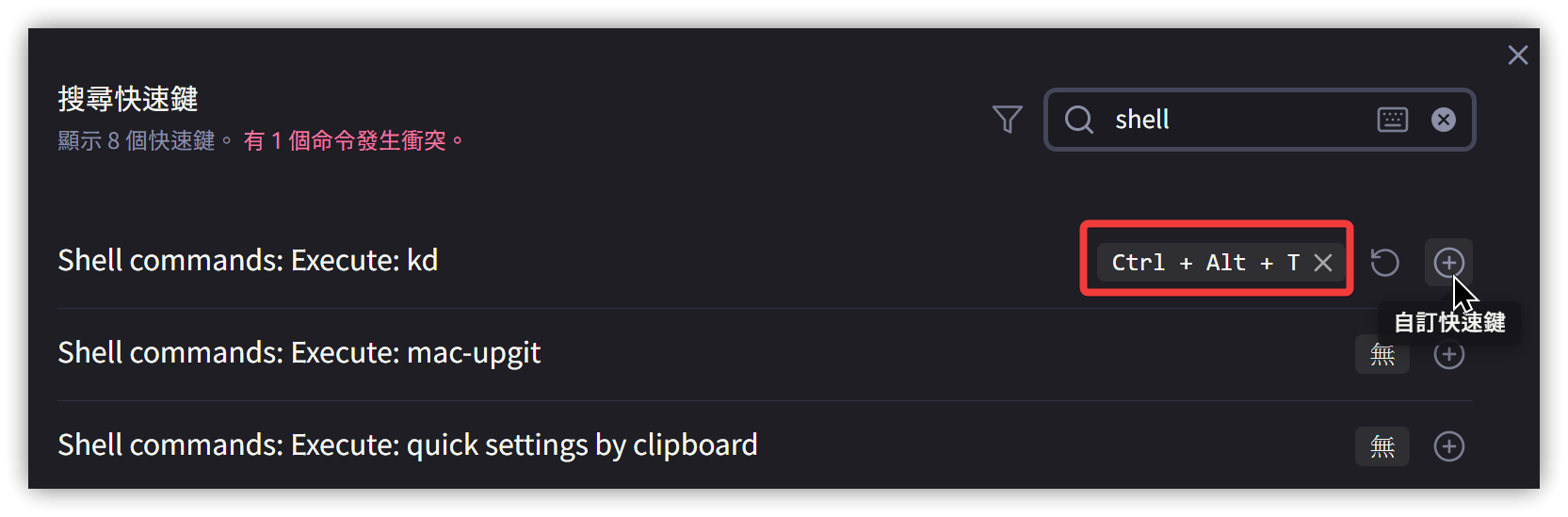
Use the hotkey settings to assign a hotkey to the
kdcommand.
-
Copy a word to the clipboard and press the hotkey to insert the
kdlookup results.

4. Other Integrations
Since kd is an executable file, it can be easily integrated with tools like AutoHotkey (Windows) and Raycast (MacOS). Please write your own scripts for this.
5. 💡 Related Links
💡 Explanatory article: https://jdev.tw/blog/8622/
💡 Explanatory article OpenCC: https://jdev.tw/blog/5656/opencc-introduction
✅ Karmenzind/kd: 跨平台命令行词典 a command-line dictionary supported Linux/Win/Mac
✅ OpenCC
- GitHub Source Code
- GitHub Configuration Files
- OpenCC 1.0.5 Windows Runtime Environment
- After version 1.0.1, OpenCC only provided source code, not executables. I obtained a user-compiled executable from this URL.
- You can also get my runtime environment here.
- Reference: OpenCC Chinese Simplified/Traditional Conversion Tool - Darkthread
- Reference: Using C# to Integrate OpenCC for Chinese Simplified/Traditional Conversion - Darkthread
- Reference: How to Customize OpenCC Vocabulary Conversion Tables - Darkthread