

Previously, I introduced several multi-column style plugins:
- Obsidian Columns: Obs084 – A Simpler Multi-Column Note-Taking Method: Using the Obsidian Columns Plugin
- Simple Columns: A New Multi-Column Choice for Obsidian: Simple Columns – Customize Appearance, Drag to Adjust Column Width, Boost Efficiency
Horizontal Block is a new plugin with the following features:
- Custom appearance: Enable the settings button for each section, allowing you to set block background color, text color, and adjust column width by reducing or enlarging it.
- Column width can be adjusted by dragging within the window.
- Column separators use
---, instead of triple backticks, making it more friendly for code blocks. - Simple Columns requires specifying an ID at the beginning, while Horizontal Block does not.
- Simple Columns offers a command to add new blocks.
1. Example
- Code language:
horizontalorhblock - Column separator:
---
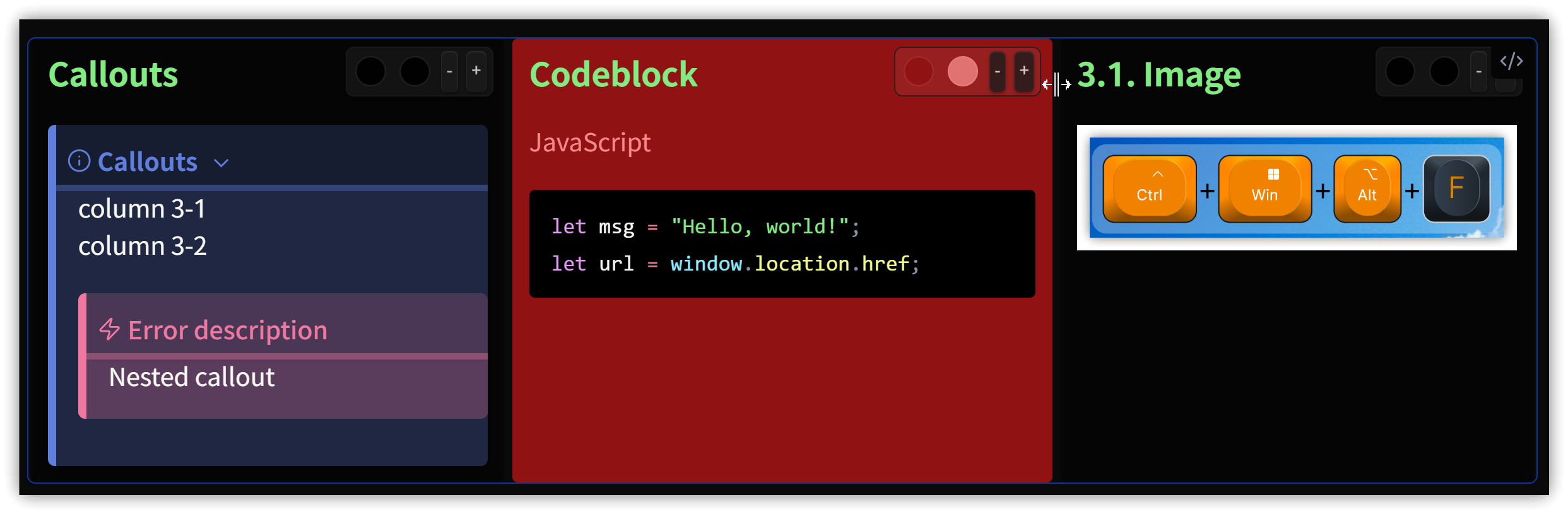
````hblock
### Callouts
> [!INFO] Callouts
> column 3-1
> column 3-2
>> [!ERROR] Error description
>> Nested callout
---
### Codeblock
JavaScript
```js
let msg = "Hello, world!";
let url = window.location.href;
```
---
### 3.1. Image
````
2. Usage
- Insert a code block, specifying the language as
horizontalorhblock. - Separate sub-blocks using
---. - In the options settings, you can enable function buttons for sub-blocks.
3. 💡 Related Links
💡 Explanation article (Traditional Chinese): https://jdev.tw/blog/8991/
💡 Explanation article (English)
💡 Explanation article (Japanese)
✅ Simple-Columns Plugin: https://github.com/Josie1902/Simple-Columns
✅ Horizontal Block Plugin: https://github.com/iCodeAlchemy/horizontal-blocks